
Wholesale and B2B
What buyers see when you sell to businesses, what the theme shows by itself, and what stays with Shopify or an app.
Business buyers log in and see their own prices, minimum quantities and volume tiers. Retail shoppers see the store as usual. Shopify holds the rules and prices, and the theme displays them.
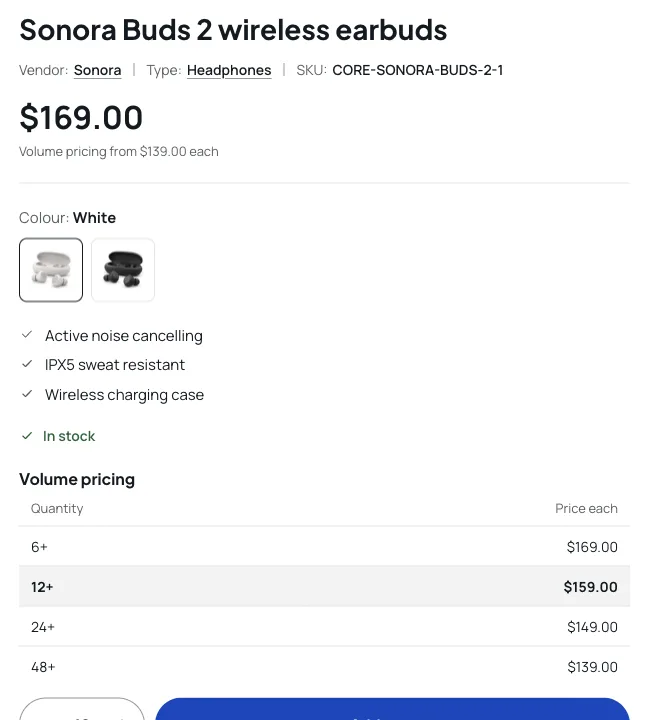
Seen in the Core demo
What to prepare
Shopify B2B is on the Basic, Grow, Advanced and Plus plans, and not on Starter or Retail. It needs customer accounts turned on, and it has limits at checkout, such as no Shop Pay, Apple Pay or Google Pay. Read Shopify's considerations and plan features first.
Set it up
Create companies in your admin
Go to Customers > Companies, and add a company, a location and a buyer. Shopify's B2B guide covers this.
Set prices and rules in a catalog
In your admin, go to Markets > Catalogs. A B2B catalog holds the prices, the quantity rules (minimum, maximum, increment) and the volume pricing.
Add the theme's parts to your product template
Check that your product template has a Volume pricing block and a Quick order list section. Core and Burrow have both. Mantel and Ridge have the block. Hanger has neither.
Check it as a buyer
Log in as a test buyer. Open a product with a rule, try the quantity buttons, and add it to the cart. Retail shoppers should see no change, so log out and check that too.
What shows by itself
These need no setup in the theme, once a catalog has the rule or the price.
- Prices. Every price follows the buyer's catalog.
- Quantity rules. Every quantity box and quick add button follows the minimum, maximum and increment.
- Volume price lines. The price, the buy button area and product cards tell the buyer about lower prices at higher quantities.
Find the part you need
| Your job | Article |
|---|---|
| Make buyers order in set amounts, such as at least 6, in sixes | Quantity rules |
| Show lower prices at higher quantities | Volume pricing |
| Let buyers order many variants of a product from one table | Quick order list |
| Share spec sheets, care guides and manuals on the product page | Tabs and accordions |
| Open a size chart from the product page | Size guide |
| Stop the free shipping bar showing | Free shipping bar |
What the theme does not do
Some of these belong to Shopify, and some need an app. It helps to know before you plan around them.
| Need | Where it lives |
|---|---|
| Payment terms, vaulted cards | Shopify, at checkout and in your admin |
| Order history and reorders | Shopify's customer accounts |
| Requests for quotes | Apps, or Shopify's draft orders |
| Order forms across the catalog, by SKU or file upload | Apps |
| Approving trade account applications | You, in your admin, or apps. A contact form can collect the request. |
| Hiding prices from guests in a mixed store | Apps. To close the whole store to anyone but B2B buyers, use Shopify's store access setting. |
| Switching between a company's locations | Not in the theme's header or mobile menu today |
Things a B2B buyer still sees
The theme shows these to every shopper, so check they make sense for your buyers.
- The free shipping bar. It is one setting for everyone. Emptying Free shipping from in Theme settings > Cart removes it for every shopper.
- Sale badges. The catalog price is compared with the variant's compare-at price, so a buyer may see a discount badge.
- Stock lines. A low stock warning such as "Only 3 left" follows real inventory, whatever the minimum is.
Something not working?
A buyer sees retail prices. They are not logged in, or their company location has no catalog.
Adding to cart is refused. The quantity broke a rule, and the theme shows Shopify's message. Check the minimum and increment in the catalog.
The Quick order list is empty. A product with one variant does not need it, so it shows nothing. With B2B buyers only, retail shoppers see nothing either.