
Page navigation
A bar of links to the parts of a long page. It builds itself from the sections below it and stays under the header.
A bar of links sits under your header while the page scrolls. Each link jumps to a part of the page, and the part in view is marked.
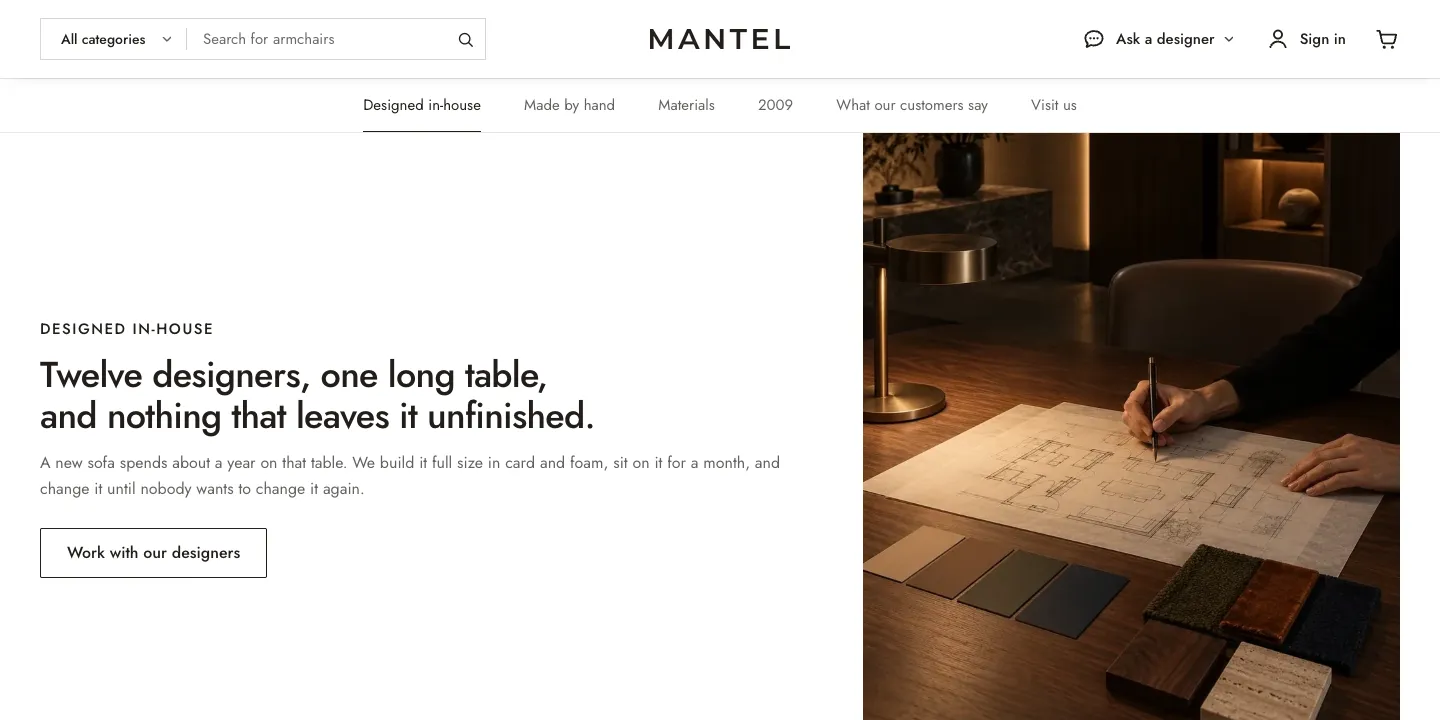
Seen in the Mantel demo
Use it on a long page with distinct chapters, such as an About page or a long service page. On a page of a few sections it only adds clutter. For a help page with topics in a side column, use the Page navigation block of Multicolumn instead: FAQ and help page shows how.
Set it up
There are no links to type. Add the section above the first chapter of the page, and it lists the sections below it.
Each link takes its words from the section it points to. A section's label comes first, then its heading. A section with neither is left out. So to name a link, or to remove it, change that section:
- To use a shorter word in the bar, give the section a label. For example, the Label block in Media with content or Label in Feature tabs.
- To keep a section out of the bar, remove its heading and label.
Stop the bar early
The bar lists everything below it until it reaches another Page navigation section. If the page ends with sections that are no chapters, such as a row of products, lower Sections to list. It stops the bar after that many sections.
Mantel's About page has six links in its bar, and you can see the whole page on the About page guide.
On phones
The bar stays on screen under the header. Links that do not fit scroll sideways, and the current one moves into view as the shopper scrolls.
Something not working?
The bar does not show. There is no section with a label or heading below it. The editor shows a line that says so, and shoppers see nothing.
A link is missing. That section has neither a label nor a heading, or it comes after the Sections to list limit.
All settings: Page navigation
| Setting | What it does |
|---|---|
| Sections to list | The bar stops after this many sections. Lower it when the page goes on with sections that do not belong in the bar. |
| Alignment | |
| Color scheme |