
Volume pricing
Show business buyers a lower price at higher quantities, with a table on the product page and short price lines elsewhere.
Volume pricing tells a business buyer what they pay at each quantity, such as $159.00 each from 12 and $139.00 each from 48. You set the prices in Shopify, and Core shows them. Retail shoppers see none of it, so you can leave the block on your template.
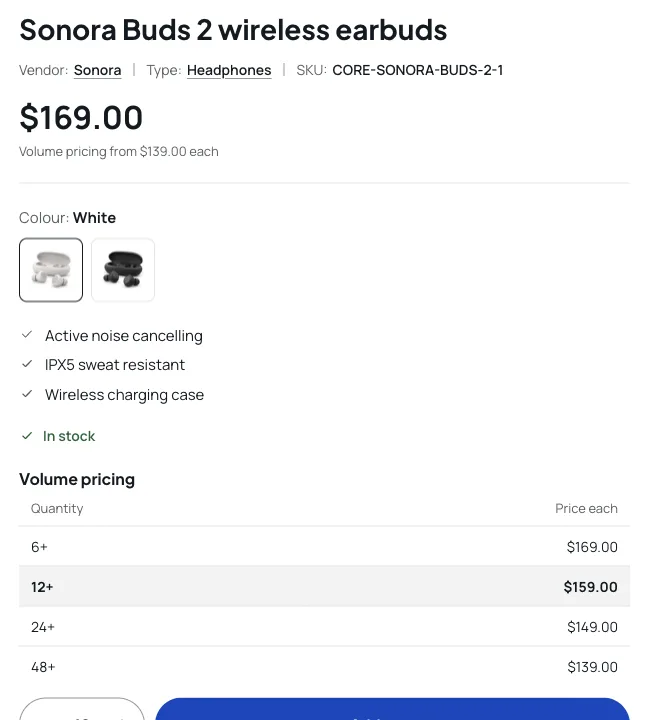
Seen in the Core demo
Set the prices
Price breaks live in a B2B catalog, so this needs Shopify B2B. In your admin, go to Markets > Catalogs, open the catalog, and add the breaks to each variant. Shopify explains the steps in its help center. Wholesale and B2B covers the whole setup.
Where the prices show
| Place | What the buyer sees |
|---|---|
| Volume pricing block | A table of quantities and the price each. The row for the current quantity is marked, and it follows the quantity box. |
| Price block | "Volume pricing from $139.00 each" under the price. |
| Buy buttons block | The price each at the quantity picked, such as "$159.00 each". |
| Product cards | "Volume pricing available". |
| Quick order list | The price each at the quantity in the cart, on each row. |
Only the table is a block you add or remove. The other lines show by themselves once the catalog has breaks.
Add the block
The product templates of Core, Burrow, Mantel and Ridge have it. Hanger's does not, so add it under Product info.
You can also add it to Below the gallery, Featured product and quick view. We recommend keeping it just above Buy buttons, so the buyer reads the prices before choosing a quantity.
The block's one setting is its Heading.
Check it
Log in as a test buyer of that company, and change the quantity. The marked row should move.
In the theme editor, a variant with no price breaks for the buyer you preview as shows a short message in place of the table. Shoppers do not see that message.
Something not working?
The table does not show. The buyer is not logged in, their company location has no catalog, or this variant has no breaks in it. Each variant has its own breaks.
Cards show a crossed-out price next to the catalog price. That is the variant's compare-at price, which Shopify gives the theme as it is. Clearing it also removes the sale price for retail shoppers.
All settings: Volume pricing
| Setting | What it does |
|---|---|
| Heading |