
Quantity rules
Set a minimum, a maximum and an increment for business buyers. Core follows them on every quantity box and quick add button.
A quantity rule makes a business buyer order in set amounts, such as at least 6, in sixes, up to 60. You set the rule in Shopify, and Core shows it and follows it wherever that buyer can add the product. Retail shoppers still step by one and see nothing extra.
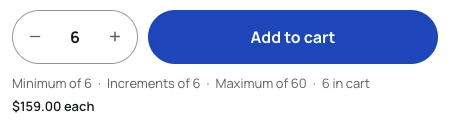
Seen in the Core demo
Set a rule
Rules live in a B2B catalog, so this needs Shopify B2B. In your admin, go to Markets > Catalogs, open the catalog, and set the rule on each variant. Shopify explains the steps in its help center. Wholesale and B2B covers the whole setup.
There is nothing to turn on in the theme.
What the buyer sees
| Place | What happens |
|---|---|
| Product page, Featured product, quick view | The quantity box starts at the minimum and steps by the increment. The rule is written under it, with how many are already in the cart. |
| Switching variant | The limits change to the new variant's rule. The typed number stays if it still fits. Otherwise it moves to the nearest allowed number. |
| Typing a number | A number the rule does not allow moves to the nearest allowed one before it is sent. |
| At the maximum | The button is turned off, with the message "You have the maximum of 60 in your cart." |
| Product cards, compare table, recommendations, Shop the look, Social media gallery | Their add buttons add the rule's minimum. |
| Cart page and cart drawer | Plus and minus step by the increment and stop at the limits. The rule is written under the line. |
| Quick order list | Each row follows its own variant's rule. |
If Shopify still refuses an amount, the shopper sees Shopify's message.
Check it
Log in as a test buyer of that company, then open a product with a rule. The theme editor preview does not show a rule unless you preview as a B2B buyer.
Something not working?
The rule does not show. The buyer is not logged in, their company location has no catalog, or this variant has no rule in it. A rule of minimum 1, increments of 1 and no maximum prints nothing.